Opera
Okay, I totally lied about using Opera for a month. After two days (one day using it on Linux, where it worked fine and one day installing and reinstalling Opera again and again on Windows trying to fix these error messages), I'm calling it quits with Opera. Though I stopped getting the error messages after my last reinstall of Opera, they just came back this evening. I had already saved some passwords before the error messages came back, including my Yale netID password, and now, since Opera has this error where it can't save to the "opera6.adr" file, I can't even get past the Yale netID login screen. When I press Enter or click "Login", nothing happens. I think Opera is trying save or lookup my password, but it can't, and nothing's happening. This is unbearable. I can't believe Opera VERSION ELEVEN is so buggy. This is worse than IE. At least IE works, even if it's super unconforming to web standards (CSS, JavaScript, etc.).
Another thing that bothered me about Opera was when I tried to add a new bookmark without a name (icon only), Opera would automatically use the URL as the name. I would then have to right click the bookmark --> go to Properties and then delete the URL name. And I can't believe it isn't set by default to display bookmarks on your bookmarks toolbar - you have to check this box "Show on bookmarks bar".
The only things I found nice about Opera in the brief time I used it are:
- I like the speed dial option. Just like Chrome and Safari show your most visited pages when you open a new tab, in Opera, it shows nine pages, which you can set, when you open a new tab. These pages can be activated by pressing Ctrl+1 through Ctrl+9.
- It's easy to add a keyword search for a search box. Just right click and add the search to your list of search providers. By default, a lot of websites already have keywords mapped to them. For example, Google is already g and Wikipedia is w by default. Adding keywords searches is more annoying in Chrome, and in Firefox, where when you add a search, it isn't listed under your search engines, it's listed as a bookmark.
Opera developers: please fix these installation bugs. Facing these error messages immediately after installation was a huge turn-off and immediately made me dislike Opera. I'm sure you've lost many users and potential users due to these bugs. If and when Opera 12 comes out, I'll give it a try if it doesn't have major bugs like the ones I encountered.
Back to Chrome.
| Lily wrote: I commend your efforts to stick with it, even through the ridiculous bugs. | 3 Feb 11, 17:34 CST |
| Erwa wrote: Oh haha, that's interesting. I do remember the days of customized scrollbar colors! I think I had custom colors for this site, too. | 3 Feb 11, 22:20 CST |
| Lily wrote: haha fair enough. Perhaps next time I will try it for one month like you. | 5 Feb 11, 20:19 CST |
Post Comment
Blood Donation
On Thursday, February 3, 2011, the Yale Concert Band had its officer elections. At the elections, I saw a band member with a pretty white balloon, which he got after he donated blood. I was quite jealous of the balloon and wanted one myself. So the next day, I donated blood and got my balloon!
I had tried to donate in August 2009, at the start of my sophomore year, but I was rejected because I had been to Mexico less than six months earlier. Parts of Mexico were considered malarial regions, so they asked me what cities I had visited and how I traveled between cities. One of the places we visited - Real de Catorce - was a small mountain village and wasn't in the Red Cross's database. Thus, since they were unsure whether I had passed through malarial regions, they rejected me.
I find the lancet tool - the thing you to prick your finger - really cool. It makes getting a blood sample pretty painless.
Post Comment
"Stay hungry, stay foolish"
This is a quote from The Whole Earth Catalog, which is now out-of-print, which I only first heard about in Steve Jobs's 2005 Stanford commencement speech. (This is up there in my list of favorite speeches with the Chipotle graduation speech.) Steve Jobs concludes his speech by saying he wishes this for himself and he wishes this for all the graduates. I've thought about this, and I think it's a great thing to wish for yourself and for others.
Stay hungry. Desire more. Don't be satisfied. Hunger for more.
Don't be afraid. Be foolish and hungry to find out.
When you're both foolish and hungry, that is a powerful combination. Being foolish can mean you're ignorant. But being foolish, you're also more likely to be unafraid to speak out, run out, jump out. Being foolish, you're not burdened by the fears and rationalization that come from knowing too much. Like they say, "Ignorance is bliss." When you don't know something, you can't be troubled by it, and you can approach things with a different perspective. When you're hungry, you want more. You have the desire to do something to satisfy your craving. The hunger drives you to seek food. Combine this desire (hunger) with the fearlessness (foolishness), and you're ready to face the world. Bold and strong, you're fueled and you're ready to seek something you want.
Don't pretend like you know something when you don't. Be foolish. And be hungry to learn.
Don't be content with what you have. Stay hungry. Yearn for more. Think about how foolish you are and how much more you can learn.
Think you can't do something? Be foolish. Heed not others' discouragement. Stay hungry and go get that burger.
Don't understand something? Admit your foolishness. Then hunger for understanding.
Why overeat and stuff yourself till you have a stomachache? Eat and leave still being a bit hungry. It'll keep you charged and on edge. It helps you focus.
Stay hungry and foolish. Always crave something, and be foolish so you can go figure out how to get it.
| Andy Tien wrote: Andy Tien likes this.. | 17 Feb 11, 06:11 CST |
| Lily wrote: Ahh, I've been thinking about this since you posted it, and... I don't know. I agree that this is a great attitude to have, but it's just so hard for me. I hate to seem foolish, which frequently results in me not learning things and ends in me seeming even more foolish anyway haha. I think the way you put it though, making seeming foolishness out to be a good thing, almost a goal, is a good way to view it. I hope I can convince myself of that a little. | 18 Feb 11, 23:03 CST |
Post Comment
Electronic Textbooks
I read the Yale Daily news pretty much every day it's in print (weekdays). One of my favorite sections is the Op-Ed page, which features opinionated articles by YDN staff or guest columnists (usually students or alumni). Last Wednesday (2/16), I read an article arguing for more collaborative textbooks. Though I think high-quality, mainstream collaborative textbooks are a long ways off, the article made me think about electronic textbooks in general, and their pros and cons in comparison with printed textbooks. Here's my list of pros and cons for eTextbooks and printed textbooks:
| eTextbook | Printed Textbook |
|---|---|
| My biggest problem with eTextbooks is the eye strain that staring at a screen for extended periods of time causes. Electronic paper (like that used in eReaders like the Kindle) has been developed which reflects ambient light and is not backlit, but the technology is not mature enough yet. The refresh rate is still too slow, so actions like zooming will not be smooth, and sometimes you may see ghost images of what was previously displayed, like in this picture: | I can read a physical book all day and my eyes won't be sore, though my mind might be tired. |
| |
| It's unwieldy moving your laptop around when you're trying to read something on it. | It's easy to snuggle up with a book on a couch or in bed. |
| I like the ease of navigation possible with eTextbooks. Like on Wikipedia, you can click on a citation and that jumps you right to the footnote explaining it. Then you can click the ^ next to the footnote to jump right back to where you were in the text. In a PDF, you can easily pull up a table of contents on the left and jump smoothly from section to section. The page numbers in an index can be directly linked to the page itself, so by clicking on the page number listed in the index, you jump directly to that page. | You have to flip back to the table of contents at the beginning of the book to look up chapters. When you look stuff up in the index, you have to spend some additional time flipping to the page listed. |
| You can easily flip between two (or more) pages or sections by pressing Alt+left and Alt+right to navigate through your page browsing history. Ideally, an eTextbook would allow for a split screen (like a text editor) where you could put any two sections of the book side-by-side. | It's really annoying flipping back-and-forth when you're comparing things, especially if you're flipping back-and-forth between the two sides of one sheet of paper. |
| Ctrl+F! Super useful for pinpointing information. | So often I find myself wishing for a real-life version of Ctrl+F when I want to find a passage or quote. Sometimes there's no index or the index doesn't list what you're looking for. |
| There's much more room for interactivity, be it pictures, dynamic diagrams and applets, or videos. An eTextbook allows for much better visualization of things. If you were reading a musical score, an eTextbook would be able to play it back to you. | You're limited to static pictures and text. |
| Highlighting and adding sticky notes is pretty easy and intuitive now, but it's still pretty hard to draw pictures and write equations unless you have a tablet PC. | It's much easier to sketch diagrams and equations on paper than on a computer. |
| You can carry around many textbooks all in one computer or eReader. | While one laptop usually outweighs one textbook, once you have several textbooks, they easily add to be heavier than your laptop. |
| Trying to read stuff on a computer is distracting. You might get the urge to check your email or Facebook. Or, you might encounter something you don't understand in your reading and then end up spending the next three hours Wikipedia surfing. | I've heard that studies have shown we comprehend things better when we read them on paper than on a screen. When reading things on a screen, we're more likely to skim. When reading things on paper, we tend to pay closer attention. |
| Screen size is limited, so you often only see part of a page at a time, or, if you do view the entire page in one screen, the text is usually very tiny. However, the ability to zoom in allows you to read at a comfortable font size that is not stressful for your eyes. | You always see the whole page, so it's easy to scan ahead. The font size is not adjustable, unfortunately, so if the print is small, you'll just have to put your head closer to the page. |
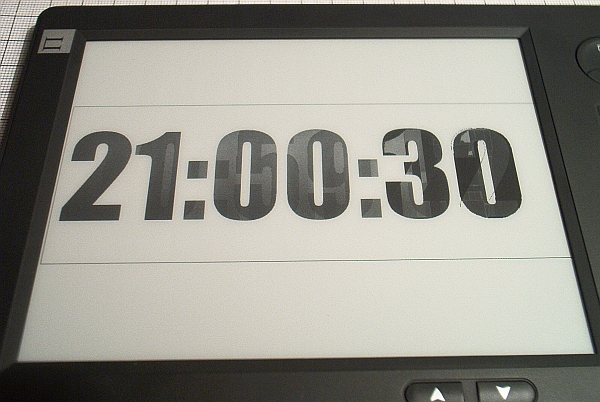
I think I would prefer an eTextbook over a print version once the technology fully matures and eTextbooks become widely available, but right now, there's no eReader that satisfies all my desires. My ideal eReader would be about the size of an iPad, but it would have an electronic paper display, so it wouldn't cause eye strain. Right now, the electronic paper displays of eReaders like the Kindle don't have color and the slowish refresh rate is still a problem that prevents smooth zooming and videos from rendering properly and other interactive stuff from being implemented. Ideally, this eReader would also be a touchscreen, allowing me to navigate and draw stuff with my fingers or with a stylus. If all of these features could be satisfied in one eReader, and eTextbooks became widely available, I would probably switch to an eReader. But until then, I prefer a good old printed textbook over an electronic textbook.
What are your thoughts on eTextbooks?
| Andy wrote: You might want to take a look at Nook, by Barnes and Noble. It has quite a few of the features that you want.. | 22 Feb 11, 09:27 CST |
| Erwa wrote: I just looked and noticed that the NOOKcolor uses a backlit display, so I think eye strain would still be a problem, like it is with staring at a computer too long. | 23 Feb 11, 00:13 CST |
Post Comment