Ctrl This, Ctrl That
I've suffered my fair share of hand injuries and aches from two much speedcubing, two much one-handed cubing, typing too long, practicing Hanon exercises on the piano, and rock climbing. In February, I experienced one more.
One Friday, I noticed some pain along the left side of my left forearm, near the wrist. I hoped it was a one time thing, ignored it, and went home for the weekend. During the weekend, I didn't notice any pain and forgot about the experience. The following Monday, however, within 20 minutes of using my computer, the pain returned. Now I was concerned. I immediately emailed the ergonomics team and scheduled a virtual assessment for the next day. I feared this might be the beginnings of carpal tunnel syndrome. However, based on a quick skim of the Wikipedia article, it seemed like my pain was in the wrong part of my wrist to be carpal tunnel syndrome.
The next day, I had my virtual ergonomic assessment, and we concluded that the injury was actually probably due to overuse of the left pinky. As a software developer who uses the terminal a lot, I end up using the Ctrl key a lot -- Ctrl+Shift+C/V for copying/pasting in the terminal, Ctrl+C for killing processes, Ctrl+R for reverse search, Ctrl+A/E to jump to the beginning and end of a line, Ctrl+U/K to delete to the beginning/end of a line, etc. This is all in additional to the standard Ctrl shortcuts, like cutting/copying/pasting, finding, selecting all text, undoing, saving, opening new tabs, and cycling through tabs. My left pinky also does a lot of Shifting. All this pinky usage led to a repetitive strain injury.
As a first step, I decided to order an ergonomic keyboard, thinking the ergonomic angle of the keyboard and the positioning of the keys might help reduce some of the tension in my wrist. I switched from using the basic HP keyboard that came with my work computer to using a Kinesis Freestyle keyboard:
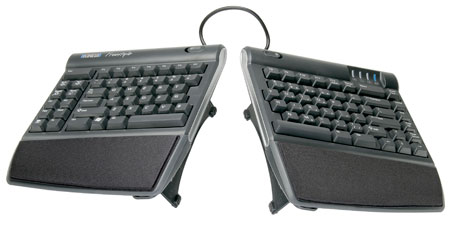
I have my Kinesis keyboard set to the maximum incline, 15 degrees, and the two halves as far apart as possible, which is about 8 inches (I now put a spiral notebook inbetween). The keys on the Kinesis keyboard are noticeably easier to depress, and the split, inclined setup also requires less rotation of my wrists, resulting in reduced tension in my fingers and forearms.
Since my injury, I've also been much more aware of my left pinky usage. I've tried to reposition my left hand in a less awkward position before using my left pinky. I now sometimes use my ring finger or thumb to hit the Ctrl key. Finally, I'll switch it up and use the right Ctrl key sometimes, too. It's been over a month since I've made all these changes, and the pain has largely gone away, though sometimes I do still feel a twinge of it if I have an intense left pinky usage session.
Considering how much time I spend at a computer, ergonomics is pretty important. Repetitive strain injury is a very real thing, and now I've experienced my first taste of it. It's definitely important to invest in an ergonomic work environment. I don't want to suffer long-term or permanent damage down the road.
Post Comment